Scene Segmentation
Scene Segmentation is the process of classifying every pixel in an image into meaningful categories, creating a detailed understanding of the environment. This capability powers mission-critical applications enabling accurate scene interpretation, safer autonomous navigation, precise spatial analytics, and context-aware decision-making at scale.
What's new?
NSDK serves semantic predictions in two forms:
- A buffer of unsigned integers for each pixel in the viewport, referred to as "packed semantic channels." The 32 bits of each integer correspond to a semantic channel and are either enabled (value is 1) or disabled (value is 0) depending on whether an object in that channel exists at that pixel. A pixel can have more than one label, e.g. both
groundandnatural_ground.
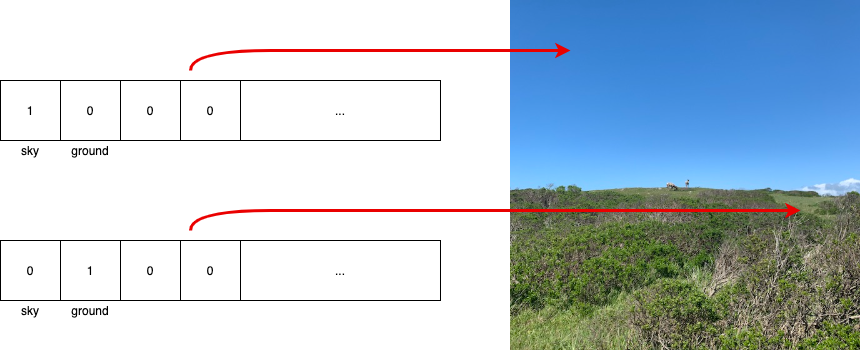
- For each semantic channel, there is a buffer of normalized (between 0 and 1) float values for each pixel in the viewport. These floats show the probability that their pixel should be classified as the specified semantic channel.
Available Semantic Channels
The following table lists the current set of semantic channels. Because the ordering of channels in this list may change with new versions of NSDK, we recommend that you use names rather than index values in your app. Use the XRSemanticsSubsystem.TryGetChannelNames method or ARSemanticSegmentationManager.ChannelNames property to verify names at runtime.
Because channel names are read from a neural network model, there will be slight delays when the scene segmentation subsystem starts, while the model is initialized, and before channel names are available. This delay can be reduced by downloading the model in advance. See Neural Network Model Preloading for more information.
| Index | Channel Name | Notes |
|---|---|---|
| [0] | sky | Includes clouds. Does not include fog. |
| [1] | ground | Includes everything in natural_ground and artificial_ground. Ground may be more reliable than the combination of the two where there is ambiguity about natural vs artificial. |
| [2] | natural_ground | Includes dirt, grass, sand, mud, and other organic / natural ground. Ground with heavy vegetation or foliage may be detected as foliage instead. |
| [3] | artificial_ground | Includes roads, sidewalks, tracks, carpets, rugs, flooring, paths, gravel, and some playing fields. |
| [4] | grass | Grassy ground, e.g. lawns, rather than tall grass. |